Best WhatsApp App for Business in 2026 (Decision Guide)
Choosing the right WhatsApp business solution depends entirely on your scale, use the WhatsApp Business App for solo operators and micro-shops, or the WhatsApp Business API.
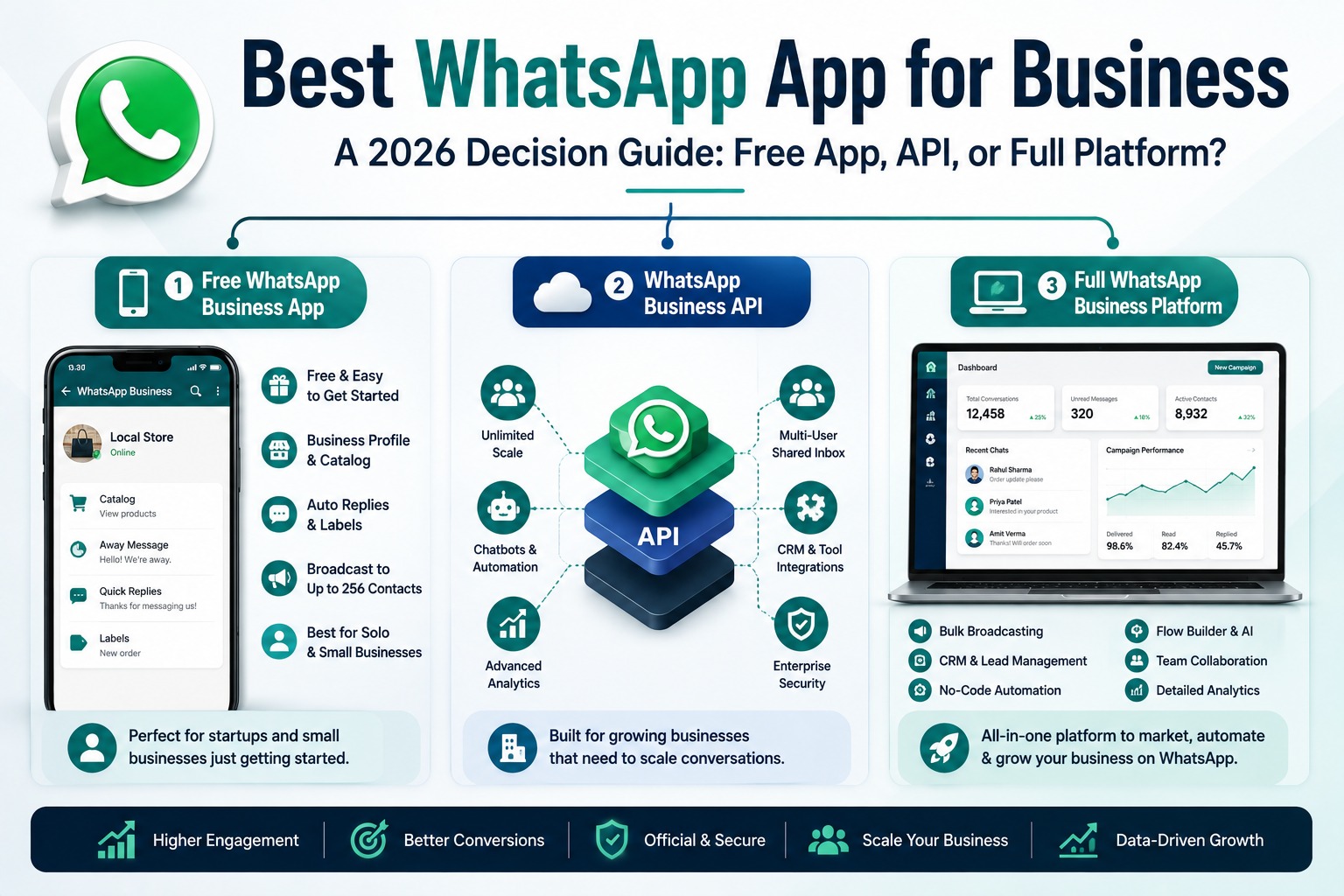
Best WhatsApp App for Business
A 2026 Decision Guide: Free App, API, or Full Platform?
Introduction
Search “best WhatsApp app for business” and you'll get a confusing mix of results the free WhatsApp Business App, dozens of “official WhatsApp API provider” platforms, and comparison articles that assume you already know the difference. If you're just trying to figure out which WhatsApp solution actually fits your business, that's not a helpful starting point.
This guide skips the jargon and starts from where most business owners actually are: not sure whether they need the free app, the official API, or a full platform built on top of it. We'll walk through what each option actually offers, who it's genuinely built for, how to choose based on your team size and goals, and which platforms are worth considering at each stage — so you can pick the right WhatsApp app for your business once, instead of migrating twice.
Table of Contents
1. The Three Types of “WhatsApp App for Business”
2. Option 1: The Free WhatsApp Business App
3. Option 2: The Official WhatsApp Business API
4. Option 3: A Full WhatsApp Business Platform
5. How to Choose the Right One for Your Business
6. Best WhatsApp Business Solutions by Business Type
7. Real Business Examples
8. Industry Use Cases
9. Best Practices When Choosing a WhatsApp Business Solution
10.Common Mistakes to Avoid
11.Comparison Table
12.FAQs
13.Conclusion & CTA
The Three Types of “WhatsApp App for Business”
Before comparing specific tools, it helps to understand that “WhatsApp app for business” actually refers to three distinct things, and most of the confusion in this space comes from these three being talked about as if they're interchangeable.
• The free WhatsApp Business App: A standalone mobile app, similar to regular WhatsApp, with basic business features like a catalog and auto-replies. Built for solo operators and very small teams.
• The WhatsApp Business API (WhatsApp Business Platform): Meta's programmable interface for scaled business messaging. It isn't an app you install it's infrastructure accessed through a Business Solution Provider (BSP).
• A full WhatsApp Business Platform built on the API: This is what most “best WhatsApp app for business” roundups are actually comparing dashboards like SyncWABA, WATI, or AiSensy that give you a usable interface, CRM, automation, and team tools on top of the raw API.
Knowing which of these three you actually need is the real first decision everything else in this guide builds on that.
Option 1: The Free WhatsApp Business App
The WhatsApp Business App is a free download available on iOS and Android, built for small businesses that want a professional presence on WhatsApp without any additional cost or setup.
• Business profile: Address, description, website, and business hours visible to anyone who messages you.
• Product catalog: A basic showcase of products or services directly within the chat interface.
• Automated greeting and away messages: Simple, rule-based automated replies for common scenarios.
• Labels: Basic contact and chat organization for a single user.
• Broadcast lists: Limited to a maximum of 256 contacts per broadcast, and only reaches contacts who have your number saved.
This is genuinely enough for a solo shop owner or a very small local business fielding a modest number of daily conversations. Where it breaks down is scale: one device, one primary user at a time, no automation beyond simple auto-replies, and a broadcast cap that makes any real marketing campaign impossible.
Option 2: The Official WhatsApp Business API
The WhatsApp Business API, officially called the WhatsApp Business Platform, is Meta's infrastructure layer for businesses that have outgrown the free app. It isn't something you download it's accessed through a Meta-authorized Business Solution Provider, which gives you a dashboard, tools, and support on top of that underlying access.
• No broadcast cap, with sending limits instead governed by your account's quality rating and verification tier.
• Chatbots and automated workflows instead of simple rule-based auto-replies.
• Multiple team members can access and respond to conversations simultaneously, rather than one device at a time.
• CRM and helpdesk integrations, connecting WhatsApp conversations to your existing business tools.
• Advanced analytics on delivery, engagement, and campaign performance.
The tradeoff is that the raw API isn't something most business owners interact with directly — it needs a BSP's dashboard on top of it to actually be usable day to day, which is where full platforms come in.
Option 3: A Full WhatsApp Business Platform
This is the category most businesses actually mean when they search for “best WhatsApp app for business” a complete dashboard built on the official API that gives you bulk messaging, automation, a shared inbox, and often a CRM, all without needing developer resources to set up.
SyncWABA falls into this category, combining unlimited bulk broadcasting, a no-code Flow Builder with AI Prompt nodes, a built-in CRM with lead-stage tracking, Meta Ads attribution logging, and a Live Chats hub for human agent takeover in one Indian-built platform rather than several separate tools stitched together.
Other platforms in this category include WATI, AiSensy, Interakt, Gallabox, and DoubleTick, each with a slightly different focus some lean toward e-commerce, some toward outbound sales, some toward simple onboarding. The right one depends on what your business actually needs day to day, which is the next section.
How to Choose the Right One for Your Business
• Team size: One person managing WhatsApp personally can often get by with the free app; two or more people needing simultaneous access need the API or a full platform.
• Message volume: If you're sending more than a couple hundred messages per campaign, the free app's 256-contact broadcast cap is already a hard wall.
• Automation needs: Simple away messages are fine on the free app; anything resembling a chatbot, drip sequence, or qualification flow needs the API.
• Lead tracking: If you're currently tracking WhatsApp leads in a spreadsheet or not at all, a platform with a built-in CRM removes a genuinely painful manual step.
• Budget and technical resources: Raw API access through a developer-first provider works if you have engineering resources; most businesses are better served by a full platform's ready-made dashboard.
Best WhatsApp Business Solutions by Business Type
• Solo entrepreneurs and very small shops: The free WhatsApp Business App is usually sufficient until conversation volume or team size grows.
• Growing SMBs needing automation and CRM: A full platform like SyncWABA, combining bulk messaging, AI chatbot automation, and lead tracking in one dashboard.
• E-commerce brands: Platforms with strong commerce integrations — catalog sync, abandoned cart recovery tend to fit best.
• Outbound sales-heavy teams: Platforms built around fast broadcast and catalog sharing for high-volume outreach.
• Agencies managing multiple client accounts: A platform with multi-workspace support to handle several businesses from one login.
• Developers building fully custom workflows: Direct API access through a developer-first provider, rather than a pre-built dashboard.
Real Business Examples
Marketing example: A boutique retailer starts on the free WhatsApp Business App, but once their broadcast list crosses 256 contacts and campaigns start getting capped, they migrate to a full platform to keep running festive sale broadcasts without limits.
Support example: A two-person customer support team keeps missing messages because only one person can be logged into the free app at a time; moving to the API-based platform lets both agents handle conversations simultaneously through a shared inbox.
Sales example: A real estate agency outgrows manually tracking WhatsApp leads in a notebook and adopts a platform with a built-in CRM, automatically moving inquiries through lead stages as conversations progress.
Developer example: A software agency building a custom client portal integrates directly with the WhatsApp Business API and webhooks through a developer-first BSP, rather than using a pre-built dashboard, since their use case requires deep custom logic.
Industry Use Cases
• Healthcare: Clinics needing appointment reminders and multi-staff conversation handling typically outgrow the free app quickly and move to an API-based platform.
• Education: Institutes managing admissions inquiries at scale benefit from automation and CRM lead tracking during peak enrollment periods.
• Real Estate: Agencies with multiple agents need simultaneous multi-user access that the free app can't provide.
• E-commerce: Order volume and cart recovery needs make a commerce-focused platform a natural fit almost immediately.
• Financial Services: Compliance and audit trail needs generally require API-level tracking rather than the free app's limited history.
Best Practices When Choosing a WhatsApp Business Solution
• Start with your actual current pain point, not a feature checklist — if broadcasting is capped, solve that first.
• Confirm official Meta Business Solution Provider status before committing to any API-based platform.
• Test with a free trial where available before migrating your verified number, since switching platforms later is more disruptive than choosing carefully upfront.
• Factor in Meta's per-conversation charges on top of any platform subscription when comparing total cost.
• Plan for growth, choosing a platform that can support your business at double its current size, not just where it is today.
Common Mistakes to Avoid
• Staying on the free app too long and hitting the 256-contact broadcast cap mid-campaign, which forces a rushed migration.
• Choosing a full platform when the free app would genuinely suffice, adding unnecessary cost and complexity for a very small operation.
• Assuming all API-based platforms are interchangeable without checking which one actually fits your specific use case (e-commerce, sales, support, agency).
• Ignoring team size when choosing, then discovering the free app's single-device limitation only after multiple staff need simultaneous access.
• Not verifying BSP status and accidentally using an unofficial tool that risks the number being banned.
Comparison Table: Free App vs API vs Full Platform
|
Feature |
Free WhatsApp Business App |
Raw WhatsApp Business API |
Full Platform (e.g. SyncWABA) |
|
Cost |
Free |
Per-conversation charges + BSP fee |
Per-conversation charges + platform subscription |
|
Broadcast limit |
256 contacts |
None (quality-rating based) |
None (quality-rating based) |
|
Multi-user access |
No (one device) |
Yes, with a BSP dashboard |
Yes |
|
Automation/chatbots |
Basic auto-replies only |
Possible, needs custom build |
Built-in, no-code |
|
CRM |
No |
Needs separate integration |
Often built in |
|
Setup effort |
Minimal |
High (developer needed) |
Low (guided onboarding) |
|
Best for |
Solo operators, very small shops |
Developers, custom builds |
Growing SMBs, agencies, enterprises |
Frequently Asked Questions
1. What is the best WhatsApp app for business in 2026?
It depends on your business size and needs. Solo operators and very small businesses are often well served by the free WhatsApp Business App, while growing businesses needing automation, multi-user access, and CRM tracking are better served by a full platform built on the official WhatsApp Business API, such as SyncWABA.
2. What's the difference between the WhatsApp Business App and the WhatsApp Business API?
The WhatsApp Business App is a free, standalone mobile app for small-scale use with a 256-contact broadcast cap and single-device access. The WhatsApp Business API is Meta's programmable infrastructure for scaled messaging, accessed through a Business Solution Provider, and supports automation, multi-user access, CRM integration, and no fixed broadcast limit.
3. Is the free WhatsApp Business App enough for a small business?
Often, yes if you're a solo operator or very small team handling a modest volume of conversations without needing automation or multi-user access. It becomes limiting once you need to broadcast to more than 256 contacts, need multiple people responding simultaneously, or want chatbot-level automation.
4. Do I need to install anything for the WhatsApp Business API?
No. Unlike the free WhatsApp Business App, the API isn't a downloadable app it's accessed through a web-based dashboard provided by your chosen Business Solution Provider, which you log into rather than install.
5. Can multiple people use the WhatsApp Business App at once?
Not effectively. The free WhatsApp Business App is designed around single-device access, which makes it difficult for more than one team member to manage conversations simultaneously. The WhatsApp Business API and platforms built on it support genuine multi-agent access through a shared inbox.
6. What's the best WhatsApp business platform for e-commerce?
Platforms with strong commerce integrations catalog sync, abandoned cart recovery, and order update automation tend to fit e-commerce businesses best. The right specific choice depends on which storefront platform you use and how deeply you need that integration to go.
7. How much does a full WhatsApp business platform cost?
Costs generally include a platform subscription fee plus Meta's per-conversation charges, which apply regardless of which BSP or platform you choose. Subscription pricing varies by provider and plan, so it's worth comparing total cost platform fee plus expected conversation volume — rather than subscription price alone.
8. When should a business upgrade from the free app to the API?
Common triggers include hitting the 256-contact broadcast limit, needing more than one person to handle conversations at once, wanting chatbot-level automation instead of simple auto-replies, or needing to track WhatsApp leads in a CRM rather than manually.
9. Can I keep my existing WhatsApp number when upgrading to the API?
Yes, in most cases. Migrating an existing number to the WhatsApp Business API is a standard process that BSPs typically assist with during onboarding, so you generally don't need to switch to a new number.
10. Is it safe to use third-party WhatsApp business apps?
It's safe as long as the platform is an official Meta Business Solution Provider or built directly on the WhatsApp Business API. Unofficial tools and modified apps that operate outside Meta's Terms of Service carry a high risk of getting your number banned, regardless of how convenient they seem.
11. What features should I look for in a WhatsApp business platform?
Key features to evaluate include unlimited or high-volume broadcasting, no-code automation or chatbot capability, a built-in CRM for lead tracking, multi-user team access, and transparent pricing that accounts for both platform fees and Meta's per-conversation charges.
12. Can agencies manage multiple clients on one WhatsApp business platform?
Yes, if the platform supports multi-workspace functionality, which allows an agency to manage several client accounts from a single login rather than juggling separate logins or tools for each client.
Conclusion
There isn't a single “best WhatsApp app for business” there's a best fit for where your business actually is right now. A solo operator doesn't need the same solution as a 10-person sales team, and neither needs what a developer building a fully custom integration needs. The mistake most businesses make isn't picking the wrong tool; it's picking a tool without first being clear on their own team size, message volume, and automation needs.
If you've outgrown the free app and want bulk messaging, AI-powered automation, and CRM lead tracking in one dashboard, without needing developer resources to set it up, SyncWABA is built for exactly that transition.
Ready to move beyond the free WhatsApp app? Start your free trial with SyncWABA or book a demo today.
Tags:
Ready to Get Started with WhatsApp Business API?
Join 1,000+ businesses using SyncWABA to grow with WhatsApp. Start free today!