How AI Chatbots Work on WhatsApp Business API (2026 Guide)
AI chatbots on the WhatsApp Business Platform use a secure connection to Meta to automate conversations. They process user messages using AI, interact with external business tools, and reply in real-time.
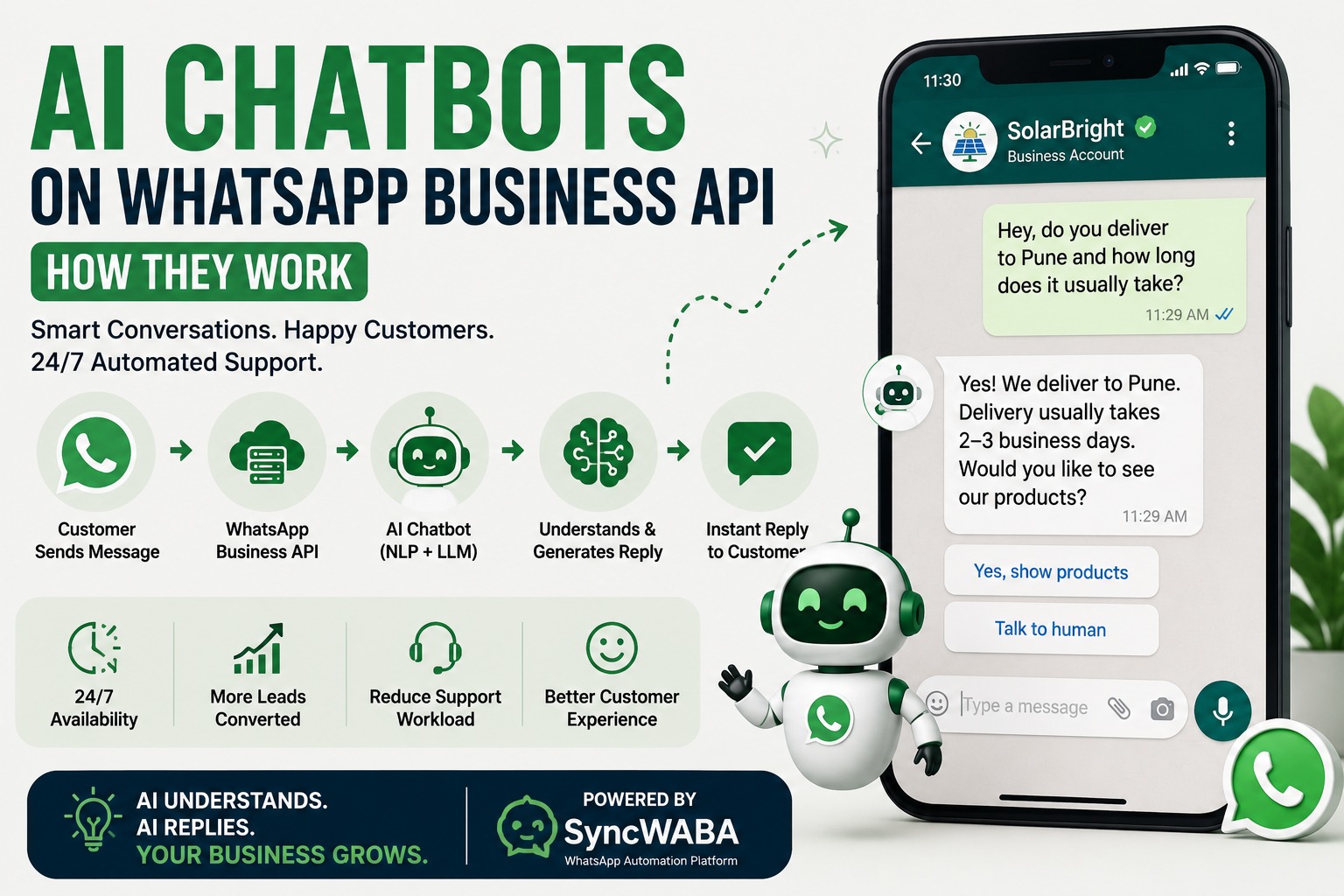
How AI Chatbots Work on WhatsApp Business API
Introduction
Every business owner has felt this pain: a customer messages on WhatsApp at 11 PM asking about pricing, and by the time someone replies the next morning, the lead has already messaged a competitor. AI chatbots exist to close that gap. But most explanations of “AI chatbots on WhatsApp” either oversimplify them into glorified auto-replies or bury you in technical jargon about webhooks and NLP models.
This guide breaks down exactly how AI chatbots work on the WhatsApp Business API what happens between a customer typing a message and receiving a smart reply, how AI chatbots differ from rule-based bots, and how platforms like SyncWABA let you build one without writing a single line of code. By the end, you'll know whether an AI chatbot is right for your business, and how to set one up in a way that actually converts.
Table of Contents
1. What Is an AI Chatbot on WhatsApp Business API?
2. Why Businesses Are Moving From Rule-Based Bots to AI Chatbots
3. How AI Chatbots Actually Work (Step-by-Step)
4. Rule-Based Bots vs AI Chatbots vs Hybrid Flows
5. Key Features of SyncWABA's AI Chatbot System
6. Real Business Examples
7. Industry Use Cases
8. Best Practices
9. Common Mistakes to Avoid
10.Comparison Table
11.FAQs
12.Conclusion & CTA
What Is an AI Chatbot on WhatsApp Business API?
An AI chatbot on WhatsApp Business API is an automated conversational system that uses natural language processing (NLP) and large language models (LLMs) to understand what a customer is asking not just match keywords and generate a relevant, human-like response in real time, inside the WhatsApp chat window.
The key word is “understand.” A traditional bot works off decision trees: “Press 1 for Sales, Press 2 for Support.” It only knows what you've told it to expect. An AI chatbot, by contrast, can read a message like “hey do you guys deliver to Pune and how long does it usually take” and correctly identify that this is a shipping/delivery question, even though nobody explicitly programmed that exact sentence.
This distinction matters because WhatsApp conversations rarely follow neat scripts. People type in Hinglish, they combine three questions into one message, they use slang, they make typos. AI chatbots are built to handle that mess. Rule-based flows are not they break the moment a customer goes off-script.
Why Businesses Are Moving From Rule-Based Bots to AI Chatbots
For years, WhatsApp automation meant static, menu-driven bots. They worked fine for simple use cases order confirmations, appointment reminders but they fell apart the moment a real conversation started.
The shift toward AI chatbots is being driven by three things:
• Customer expectations have changed. People are used to fast, natural replies from every app they use, and a robotic “Sorry, I didn't understand that” response feels outdated.
• Lead volume has grown faster than support teams. Businesses running Meta Ads into WhatsApp are seeing spikes in inbound messages that no human team can respond to instantly.
• AI models have become cheap and fast enough to run at conversation scale. What used to require an in-house data science team can now be configured through a simple prompt and temperature setting inside a no-code flow builder.
The result is that AI chatbots are no longer a “nice to have” reserved for enterprise budgets. They're becoming the default expectation for any business serious about converting WhatsApp leads.
How AI Chatbots Actually Work (Step-by-Step)
Here's what happens behind the scenes between a customer sending a message and receiving a reply:
Step 1: The message reaches the WhatsApp Business API. A customer sends a message to your business WhatsApp number. Meta's WhatsApp Business Platform receives it and forwards it to your BSP (Business Solution Provider) in this case, SyncWABA through a webhook.
Step 2: The Flow Builder decides what to do with it. SyncWABA's Flow Builder checks whether this contact is already inside an active flow, and if a Decision/Condition node applies. If the message needs an intelligent response rather than a fixed one, it's routed to an AI Prompt node.
Step 3: The AI Prompt node processes the message. This is where the actual “AI” happens. The AI Prompt node sends the customer's message along with context like conversation history, business FAQs, or product information to a configured language model. You control the model, the temperature (how creative vs. precise the responses are), and the maximum tokens (how long a response can be).
Step 4: The model generates a response. The AI model interprets intent, pulls relevant information, and generates a natural-language reply. If the question requires structured data like a price list or business hours the flow can combine the AI response with a Template or List Message node.
Step 5: The response is sent back through WhatsApp. The reply is delivered to the customer within the same chat, typically in a few seconds. If the AI detects the query is too complex, sensitive, or the customer explicitly asks for a human, the conversation is escalated through the Live Chats hub for human agent takeover.
Step 6: The conversation is logged and the lead is updated. Every interaction updates the contact's record in SyncWABA's built-in CRM, moving them through lead stages Open Lead, Contacted, Interested, Qualified, Converted based on what was discussed.
Rule-Based Bots vs AI Chatbots vs Hybrid Flows
Most businesses don't actually need to choose one or the other the smartest WhatsApp automations combine both. Rule-based logic is faster and cheaper for predictable steps (like confirming an order or collecting a phone number), while AI Prompt nodes handle the unpredictable, conversational parts.
|
Aspect |
Rule-Based Bot |
AI Chatbot |
Hybrid Flow (Recommended) |
|
Understands free-text questions |
No |
Yes |
Yes |
|
Setup complexity |
Low |
Medium |
Medium |
|
Cost per conversation |
Lowest |
Higher (model usage) |
Balanced |
|
Handles structured steps (forms, bookings) |
Best |
Weaker alone |
Best |
|
Handles open-ended queries |
Breaks easily |
Strong |
Strong |
|
Escalates to human when needed |
Manual only |
Configurable |
Configurable |
|
Best for |
Simple confirmations, reminders |
FAQ handling, lead qualification |
Full customer journeys |
In SyncWABA's Flow Builder, this hybrid approach is built in by design you can mix Send Message, Ask Question, and Decision nodes with AI Prompt nodes in the same flow, so structured steps stay predictable and open conversation stays natural.
Key Features of SyncWABA's AI Chatbot System
SyncWABA's AI chatbot capability is built directly into its Flow Builder, rather than being a bolted-on separate tool. That means the same flow that sends a WhatsApp template can also branch into an AI-powered conversation, then hand off to a human agent all without switching platforms.
• AI Prompt node with configurable model, temperature, and token limits so you control how creative or precise responses are, and how long they can run.
• Decision/Condition nodes that route customers based on what they say, their lead stage, or how they arrived (organic vs. Meta Ads).
• Ask Question and List Message nodes to collect structured information (name, city, budget) even mid-AI-conversation.
• Live Chats hub with human agent takeover, so any AI conversation can be picked up by a real person the moment it needs a human touch.
• Meta Ads attribution logging, which means when a lead comes from a Facebook or Instagram ad, the AI chatbot already knows which ad, which offer, and which headline brought them in and can tailor its first response accordingly.
• Built-in CRM sync, automatically moving contacts through Open Lead, Contacted, Interested, Qualified, and Converted stages as the AI conversation progresses.
• Multi-workspace support, useful for agencies managing AI chatbots across multiple client accounts from one login.
Real Business Examples
Marketing example: An e-commerce brand runs a Meta Ad promoting a festive sale. When someone clicks “Send Message,” SyncWABA logs the ad ID and headline against that contact. The AI chatbot greets them by referencing the specific offer they clicked on, answers questions about sizing or shipping, and if they express strong interest, moves them to “Qualified” and notifies the sales team.
Support example: A SaaS company's customers frequently ask “how do I reset my password” in a dozen different phrasings. Instead of building a decision tree for every possible wording, the AI Prompt node is trained on the company's help center content and answers naturally, only escalating to a human agent when the issue is account-specific.
Sales example: A real estate agency uses an AI chatbot to have an initial conversation with property inquiries budget, preferred location, number of bedrooms before a human agent ever gets involved. By the time a salesperson picks up the conversation via Live Chat takeover, they already have a qualified lead with context, not a cold “hi, tell me about your properties” message.
Developer example: A development agency integrates SyncWABA's REST API and webhooks to sync AI chatbot conversation data into their client's external CRM, so lead stage changes trigger automated internal Slack notifications for the sales team.
Industry Use Cases
• Healthcare: AI chatbots answer common questions about clinic timings, doctor availability, and general symptoms, before routing appointment booking to a structured flow.
• Education: Institutes use AI chatbots to answer admission queries fee structure, course details, eligibility and only escalate to counselors for detailed one-on-one guidance.
• Real Estate: Chatbots pre-qualify property inquiries by budget and location before human agents step in.
• Financial Services: AI chatbots handle general product questions (loan eligibility ranges, document requirements) while keeping anything account-specific strictly with human agents for compliance reasons.
• E-commerce: Chatbots answer product, sizing, and delivery questions instantly, reducing cart abandonment caused by unanswered pre-purchase questions.
Best Practices for Building an AI Chatbot on WhatsApp
Getting real value from an AI chatbot isn't just about turning it on it's about how you configure and monitor it.
• Keep the temperature setting low for factual queries (pricing, policies, hours) so the AI doesn't improvise details it shouldn't.
• Feed the AI Prompt node accurate, up-to-date business information outdated FAQ content leads to wrong answers and lost trust.
• Always design an escalation path. Every AI flow should have a clear way for a customer to reach a human agent, and a way for the AI to recognize when it should hand off.
• Use Decision nodes to segment before the AI takes over, so the AI isn't trying to handle every possible topic in one giant prompt.
• Monitor real conversations regularly. AI responses can drift or misfire; reviewing logs weekly catches issues before they affect many customers.
• Combine AI with structured nodes for anything transactional bookings, payments, or order confirmations are safer as rule-based steps than freeform AI replies.
Common Mistakes to Avoid
• Treating the AI chatbot as fully autonomous with no human oversight or escalation path — this erodes customer trust when the bot gets something wrong.
• Setting temperature too high for business-critical information, leading to inconsistent or inaccurate answers about pricing or policies.
• Not updating the AI's source information after a price change, policy update, or new product launch.
• Ignoring Meta's WhatsApp messaging policies, including the 24-hour customer service window, which still applies even when an AI is generating the responses.
• Building one massive, unstructured prompt instead of breaking the conversation into logical decision points this makes responses less predictable and harder to debug.
Comparison Table: Rule-Based vs AI vs SyncWABA's Hybrid Approach
|
Feature |
Basic WhatsApp Business App |
Rule-Based Bot Platforms |
SyncWABA (Hybrid AI + Flow Builder) |
|
Automated greeting/away messages |
Yes |
Yes |
Yes |
|
Menu-driven decision trees |
No |
Yes |
Yes |
|
Understands free-text/NLP queries |
No |
No |
Yes (AI Prompt node) |
|
Meta Ads attribution logging |
No |
Rare |
Yes |
|
Built-in CRM with lead stages |
No |
Varies |
Yes |
|
Human agent takeover mid-automation |
No |
Varies |
Yes (Live Chats hub) |
|
Multi-workspace for agencies |
No |
Varies |
Yes |
|
No-code flow building |
N/A |
Yes |
Yes |
Frequently Asked Questions
1. What is an AI chatbot on WhatsApp Business API?
An AI chatbot on WhatsApp Business API is an automated system that uses natural language processing and large language models to understand customer messages and respond naturally, rather than relying only on fixed menus or keyword triggers. It's connected through a Business Solution Provider like SyncWABA, which routes incoming messages through a flow that can include AI-powered nodes alongside structured steps. This lets a business handle open-ended questions, qualify leads, and still maintain consistent, on-brand responses at scale.
2. How is an AI chatbot different from a regular WhatsApp bot?
A regular (rule-based) bot works off decision trees it only understands the exact options or keywords it was programmed to expect, like “Reply 1 for Sales.” An AI chatbot can interpret free-text messages, understand context, and generate relevant responses even to questions it wasn't explicitly programmed for. Most modern platforms, including SyncWABA, let you combine both approaches in a single flow.
3. Do I need coding skills to set up an AI chatbot on WhatsApp?
No. Platforms like SyncWABA offer a no-code Flow Builder where you configure an AI Prompt node by selecting a model, setting a temperature, and connecting it to other nodes like Decision, Ask Question, or Template. Developers can go further using SyncWABA's REST API and webhooks for custom integrations, but it isn't required for standard use.
4. What does “temperature” mean in an AI chatbot configuration?
Temperature controls how creative or predictable the AI's responses are. A lower temperature produces more consistent, literal answers ideal for factual information like pricing or policies. A higher temperature allows more varied, conversational phrasing, which can feel more natural but carries a higher risk of the AI improvising details it shouldn't.
5. Can an AI chatbot on WhatsApp hand off to a human agent?
Yes. In SyncWABA, any AI-driven conversation can be picked up by a human agent through the Live Chats hub at any point, without the customer needing to restart the conversation. This is typically configured so the AI escalates automatically when it detects a complex query, a frustrated customer, or an explicit request to speak with a person.
6. Is an AI chatbot compliant with WhatsApp's messaging policies?
Yes, as long as the underlying messaging still follows Meta's rules including using approved templates for messages sent outside the 24-hour customer service window, and respecting opt-in requirements. The AI itself doesn't bypass these policies; it operates within the same API rules as any other automated or manual message.
7. How much does it cost to run an AI chatbot on WhatsApp?
Costs typically include your WhatsApp Business API/BSP subscription plus usage-based charges for the underlying AI model calls, which scale with conversation volume and response length. Businesses can manage this by keeping AI Prompt responses concise (via token limits) and using rule-based nodes for parts of the conversation that don't need AI at all.
8. Can AI chatbots qualify leads automatically?
Yes. By combining AI Prompt nodes with Decision nodes and CRM integration, a chatbot can ask qualifying questions, interpret the answers, and automatically move a contact through lead stages from Open Lead to Qualified before a salesperson ever gets involved.
9. What happens if the AI chatbot doesn't understand a message?
Well-designed flows include fallback logic: if the AI's confidence is low or the message falls outside expected topics, the conversation is routed to a human agent or a simplified menu instead of guessing. This prevents the chatbot from giving a confidently wrong answer.
10. Can I use an AI chatbot for both sales and support on the same WhatsApp number?
Yes. Using Decision nodes early in the flow, you can route a conversation toward a sales-focused AI Prompt or a support-focused one based on what the customer says, their existing lead stage, or how they contacted you (organic message vs. Meta Ad click).
11. Do AI chatbots work with Hinglish or regional languages?
Modern AI language models generally handle mixed-language input like Hinglish reasonably well, since they're trained on large amounts of real-world conversational text. Response quality in a specific regional language depends on the model configured in the AI Prompt node, so it's worth testing with real customer phrasing before fully relying on it.
12. How do I know if my business needs an AI chatbot instead of a rule-based bot?
If your WhatsApp conversations are mostly predictable appointment confirmations, order status, simple menus a rule-based flow may be enough. If customers frequently ask varied, open-ended questions, or your lead volume has outgrown what your team can personally reply to, an AI chatbot (or hybrid flow) will handle that variability far better.
Conclusion
AI chatbots on WhatsApp Business API aren't about replacing your team they're about making sure no lead waits three hours for a reply just because it arrived outside business hours. The businesses getting the most out of this technology aren't the ones that automate everything blindly; they're the ones that combine structured flows for predictable steps with AI-powered conversation for everything else, and always keep a clear path to a human agent.
SyncWABA's Flow Builder was designed around exactly this hybrid approach AI Prompt nodes, Decision logic, CRM sync, and Live Chat takeover, all in one no-code system.
Ready to see it in action? Start your freetrial or book a demo to build your first AI chatbot flow on SyncWABA today.
Tags:
Ready to Get Started with WhatsApp Business API?
Join 1,000+ businesses using SyncWABA to grow with WhatsApp. Start free today!