How to Run WhatsApp Marketing Campaigns for Your Business
Running a WhatsApp marketing campaign involves setting up a business profile, building an opt-in contact list, and sending targeted messages. Success relies on keeping texts short, using media, and following strict rules to avoid spam.
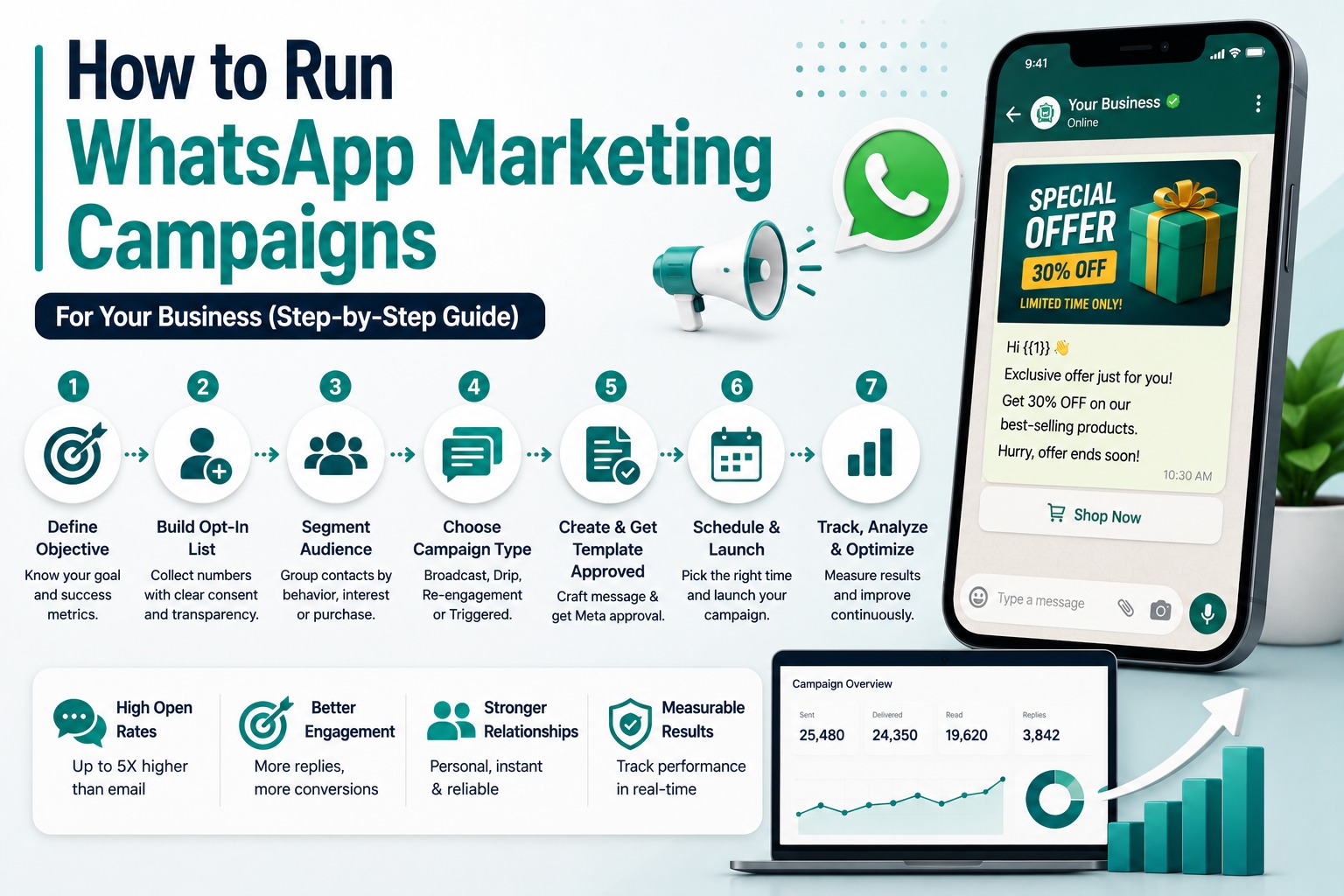
How to Run WhatsApp Marketing Campaigns For Your Business (Step-by-Step Guide)
Introduction
Most businesses' first WhatsApp campaign is the same message sent to their entire contact list, and it usually underperforms not because WhatsApp doesn't work as a marketing channel, but because it wasn't run like one. WhatsApp messages get opened at a dramatically higher rate than email, and most are read within minutes of arriving, which makes the channel genuinely powerful when it's used with the same intent as any other marketing campaign: a clear goal, a properly consented audience, and a message built for the specific segment receiving it.
This guide walks through exactly how to plan, launch, and optimize a WhatsApp marketing campaign from scratch building a compliant opt-in list, segmenting your audience, choosing the right campaign type, and tracking what's actually working. If you haven't yet built your message templates, our companion guide on WhatsApp marketing templates that convert is a good place to start alongside this one.
Table of Contents
1. Why WhatsApp Campaigns Need a Real Strategy
2. Step 1: Define Your Campaign Objective
3. Step 2: Build a Compliant Opt-In List
4. Step 3: Segment Your Audience
5. Step 4: Choose Your Campaign Type
6. Step 5: Create and Get Your Template Approved
7. Step 6: Schedule and Launch
8. Step 7: Track Performance and Optimize
9. Campaign Ideas by Business Goal
10.Real Business Examples
11.Best Practices
12.Common Mistakes to Avoid
13.Comparison Table
14.FAQs
15.Conclusion & CTA
Why WhatsApp Campaigns Need a Real Strategy
WhatsApp open rates commonly run around 80%, roughly five times higher than email, and a large share of messages are read within the first five minutes of arriving. That's a real opportunity, but it's also exactly why a poorly targeted campaign does more damage on WhatsApp than it would on a lower-attention channel an irrelevant message lands in front of someone almost immediately, and their reaction (ignoring it, opting out, or reporting it) directly affects your account's standing with Meta.
Treating WhatsApp like a send button one message, one audience, one send leaves most of that opportunity on the table. Treating it like an actual campaign, with a defined objective, segmented audience, and a measured result, is what separates businesses that get real return from the channel from those that get a one-time spike in reads and not much else.
Step 1: Define Your Campaign Objective
Every campaign should start with one measurable goal driving sales, re-engaging inactive customers, promoting a new product, or something else specific. This single decision shapes everything downstream: which segment you message, what the template says, and what you'll measure as success.
Example objectives: “Recover 15% of abandoned carts from the last 30 days,” “Re-engage customers who haven't purchased in 90 days,” or “Drive 200 sign-ups for a new product launch.” Specific, measurable objectives make it obvious afterward whether the campaign actually worked.
Step 2: Build a Compliant Opt-In List
This step isn't optional messaging contacts who haven't explicitly consented is the fastest way to get flagged or banned on the WhatsApp Business API, regardless of how good the campaign itself is.
• Checkout opt-in: A simple consent checkbox at checkout (“Get order updates and offers on WhatsApp”) converts well since the customer is already sharing their number.
• Website pop-up or embedded form: Offering a small incentive (“Get 10% off join our WhatsApp list”) is one of the fastest ways to grow a subscriber base.
• QR codes: On packaging, receipts, or in-store signage, a QR code that opens a WhatsApp conversation makes opt-in effortless for offline customers.
• Post-purchase invitation: Right after a purchase is a natural, low-friction moment to invite a customer into ongoing WhatsApp updates.
Whatever channel you use, the opt-in message should clearly state what kind of messages the customer will receive and roughly how often vague consent tends to produce more complaints and blocks down the line.
Step 3: Segment Your Audience
Sending the same broadcast to your entire list is one of the fastest ways to burn through it. Segmentation grouping contacts by behavior, purchase history, or engagement has been shown to meaningfully increase conversion rates compared to blanket sends, simply because the message actually matches what that group cares about.
• New leads: Haven't purchased yet good candidates for welcome offers or product education.
• Frequent buyers: Reward and retain with early access or loyalty-oriented messaging.
• Cart abandoners: Time-sensitive recovery messages referencing the specific item left behind.
• Inactive customers: No purchase in 60-90+ days candidates for a win-back campaign, not aggressive selling.
Even basic segmentation new vs. repeat vs. inactive makes a meaningful difference over sending one message to everyone.
Step 4: Choose Your Campaign Type
|
Campaign Type |
What It Is |
Best For |
|
One-time message sent to a full opted-in list or segment |
Announcements, flash sales, general updates |
|
|
Automated flow / drip |
A sequence triggered by behavior (purchase, cart abandonment, inactivity) |
Abandoned cart recovery, onboarding, win-back |
|
Festival / seasonal |
Personalized offers tied to occasions (Diwali, Eid, New Year) |
Building relationship and seasonal revenue spikes |
|
Post-purchase follow-up |
Automated check-in a few days after delivery |
Building trust, gathering feedback, upsell openings |
|
Replenishment nudge |
Reminder to reorder consumable products |
Recurring-purchase businesses |
Automated flows tend to significantly outperform plain one-time broadcasts on conversion, since they reach the customer at a behaviorally relevant moment rather than an arbitrary send time.
Step 5: Create and Get Your Template Approved
Any business-initiated marketing message outside an active conversation needs a Meta-approved template. Keep the message concise, personalize it with variables (name, product, offer), include a clear single call to action, and add a one-click opt-out option where relevant. Template review can take anywhere from minutes to a few hours, so build in buffer time before your intended launch date, especially if the template might need revision.
Step 6: Schedule and Launch
Time your send around when your audience is actually likely to engage for most consumer audiences, that tends to be outside core working hours, though this varies by industry and should be tested rather than assumed. Avoid sending your entire segment at once if your platform supports throttled sending; a gradual send pattern is gentler on your quality rating than a single massive burst.
Step 7: Track Performance and Optimize
• Delivery and read rate: Confirms the message reached and was seen by recipients.
• Click-through rate: Shows how many recipients engaged with your call to action.
• Conversion rate: The percentage who completed the actual goal a purchase, a sign-up, a reply.
• Opt-out rate: A widely used benchmark is keeping this under 0.5% per campaign; a spike signals messaging fatigue or poor targeting and should prompt a review of frequency or relevance.
Run small tests on message copy, send timing, and offer type between campaigns small, consistent improvements in these variables compound significantly at scale.
Campaign Ideas by Business Goal
• Drive immediate sales: Flash sale broadcast to your full opted-in list, or a segment likely to convert quickly.
• Recover lost revenue: Automated cart abandonment flow triggered a few hours after checkout is left incomplete.
• Build retention: Post-purchase follow-up 2-3 days after delivery, asking how the product is working out.
• Re-engage lapsed customers: A gentle win-back offer after 60-90 days of inactivity, not an aggressive discount blast.
• Reward loyalty: An automated acknowledgment message triggered after a customer's 5th purchase, paired with a small reward.
Real Business Examples
Marketing example: An e-commerce brand runs a segmented festival campaign, sending different offers to first-time buyers versus repeat customers, rather than one blanket discount to the full list.
Support example: A subscription business uses a post-purchase follow-up flow to check in 3 days after delivery, catching product issues early and reducing return requests.
Sales example: A real estate agency segments its list by budget range and only sends new-listing alerts to buyers whose stated budget matches the property, keeping relevance high and opt-outs low.
Developer example: An agency manages segmentation logic and automated flows for multiple clients through SyncWABA's Campaign Manager and Flow Builder, tracking opt-out rates per client to catch fatigue before it escalates.
Best Practices
• Keep opt-out rate below 0.5% per campaign as a working benchmark treat spikes as a signal to adjust frequency or targeting.
• Personalize beyond just the first name, referencing actual purchase history, product interest, or behavior where possible.
• Use rich media where it fits, since images, videos, and interactive buttons generally outperform plain text for engagement.
• Keep messages concise WhatsApp is a messaging app, not an email newsletter, so get to the point and make the next step obvious.
• Coordinate with other channels so WhatsApp complements email and SMS rather than duplicating the same message across all three simultaneously.
Common Mistakes to Avoid
• Sending to your entire list without segmentation regardless of relevance, which increases opt-outs and reduces overall channel performance over time.
• Treating WhatsApp campaigns as one-off sends instead of an ongoing calendar with defined objectives and measured results.
• Skipping the opt-in step or using vague consent language that doesn't clearly explain what the customer is signing up for.
• Ignoring opt-out rate as a signal and continuing the same frequency or targeting even after it climbs noticeably.
• Launching without a defined success metric, making it impossible to tell afterward whether the campaign actually worked.
Comparison Table: Broadcast vs Automated Flow Campaigns
|
Aspect |
One-Time Broadcast |
Automated Flow / Drip |
|
Trigger |
Manual send at a chosen time |
Customer behavior (purchase, cart abandonment, inactivity) |
|
Relevance |
General, same message to the segment |
Highly relevant to the specific moment |
|
Typical conversion |
Lower |
Meaningfully higher on the same audience |
|
Setup effort |
Low, one-time |
Higher upfront, then runs automatically |
|
Best for |
Announcements, flash sales |
Cart recovery, onboarding, win-back, replenishment |
Frequently Asked Questions
1. How do I run a WhatsApp marketing campaign?
Start by defining a specific, measurable objective, then build a compliant opt-in list, segment your audience by behavior or purchase history, choose between a one-time broadcast or an automated flow, create and get your message template approved by Meta, launch with a throttled send if possible, and track metrics like read rate, click-through, conversion, and opt-out rate to optimize future campaigns.
2. Do I need permission to send WhatsApp marketing messages?
Yes. The WhatsApp Business API requires explicit opt-in consent before you can send marketing messages to a contact. Messaging without consent is a policy violation that significantly increases the risk of your number being flagged or banned, regardless of how relevant the content is.
3. What's the best way to collect WhatsApp opt-ins?
Common high-converting entry points include a consent checkbox at checkout, a website pop-up offering a small incentive to join, QR codes on packaging or in-store signage, and post-purchase invitations. The opt-in message should clearly state what kind of messages the customer will receive and roughly how often.
4. How much does audience segmentation actually improve results?
Segmented campaigns generally convert meaningfully better than blanket sends to an entire list, since the message matches what that specific group actually cares about. Even basic segments new leads, repeat customers, inactive contacts make a noticeable difference over one-size-fits-all broadcasts.
5. What is a good WhatsApp campaign opt-out rate?
A commonly used benchmark is keeping opt-out rate under 0.5% per campaign. If you're seeing higher numbers consistently, it usually signals that your messaging frequency is too high or your targeting isn't relevant enough to the segment receiving it.
6. Should I use one-time broadcasts or automated flows?
Both have a place. One-time broadcasts work well for announcements and time-sensitive offers, while automated flows like cart abandonment or win-back sequences tend to convert meaningfully better because they reach customers at a specific, behaviorally relevant moment rather than an arbitrary send time.
7. How often should I send WhatsApp marketing messages?
There's no universal fixed number, but sending too frequently increases opt-outs and blocks. It's best to start conservatively, watch your opt-out rate as a signal, and adjust frequency based on engagement rather than assuming more messages automatically means more results.
8. What metrics should I track for a WhatsApp campaign?
Key metrics include delivery and read rate, click-through rate on any call-to-action buttons, conversion rate against your defined goal, and opt-out rate as a health signal for your list and messaging frequency. Tracking these consistently across campaigns makes it possible to compare what's actually improving results.
9. Can I run WhatsApp marketing alongside email and SMS?
Yes, and coordinating channels generally performs better than running them in isolation. WhatsApp works well as part of a cross-channel strategy, as long as the same message isn't duplicated identically across all channels at the same time, which can feel repetitive to the customer.
10. What's a good first WhatsApp campaign to run?
A simple welcome sequence for new opt-ins, or a straightforward abandoned cart recovery flow if you're in e-commerce, are both good starting points they have a clear, measurable objective and a naturally relevant audience, which makes it easier to learn what performs well before scaling to more complex segmented campaigns.
11. How do festival or seasonal campaigns fit into a WhatsApp strategy?
Seasonal campaigns tied to occasions like Diwali, Eid, or New Year work best as personalized offers for existing customers rather than mass, generic sends. The goal is making customers feel remembered with a relevant offer, not simply broadcasting a discount to everyone at once.
12. Can small businesses run effective WhatsApp marketing campaigns without a large team?
Yes. A no-code campaign manager with built-in segmentation and automated flows lets small teams run structured campaigns like cart recovery or win-back sequences without manually building and sending each message, making sophisticated campaign strategy accessible without a large marketing team.
Conclusion
A WhatsApp marketing campaign that actually works isn't about sending more messages it's about sending the right message to the right segment, at a moment that's relevant to them, and measuring whether it worked. Objective, opt-in, segmentation, and tracking aren't extra steps on top of a WhatsApp broadcast; they're what turns a broadcast into an actual campaign.
SyncWABA's Campaign Manager and Flow Builder are built to handle this end-to-end from opt-in collection and segmentation to automated flows and performance tracking without needing to stitch together multiple separate tools.
Ready to run WhatsApp campaigns that actually convert? Start your free trial with SyncWABA or book a demo today.
Tags:
Ready to Get Started with WhatsApp Business API?
Join 1,000+ businesses using SyncWABA to grow with WhatsApp. Start free today!